Simple Web Scraping with Python : Extracting Book Details from an E-commerce Site
The primary objective was to scrape book titles, prices, and ratings from the website ‘Books to Scrape’. This information was then compiled into a structured format and saved as a CSV file. This project involved several key steps :
- Sending HTTP requests to the website.
- Parsing the HTML content.
- Extracting relevant details.
- Storing the data in a structured format.
Tools and Libraries
We leveraged the following Python libraries for this project:
- Requests: For sending HTTP requests to the website.
- BeautifulSoup: For parsing HTML content.
- Pandas: For storing and manipulating the data.
- Time: To pause between requests and avoid getting blocked.
Step-by-Step Implementation
Here’s a breakdown of the implementation:
- Define the URL: We started by specifying the base URL of the website.
url = “http://books.toscrape.com/”
2. Extract Book Details Function: A function get_book_details was created to fetch and parse details of individual books. This function sends a request to the book’s page and extracts the title, price, and rating using BeautifulSoup.
def get_book_details(book_url):
try:
response = requests.get(book_url)
response.raise_for_status()
soup = BeautifulSoup(response.content, ‘html.parser’)
title = soup.find(‘h1’).text
price = soup.find(‘p’, class_=’price_color’).text
rating = soup.find(‘p’, class_=’star-rating’)[‘class’][1]
return {
‘Title’: title,
‘Price’: price,
‘Rating’: rating
}
except requests.RequestException as e:
print(f”Request failed: {e}”)
return None
except AttributeError as e:
print(f”Parsing failed: {e}”)
return None
3. Scrape Multiple Pages: We looped through the first three pages of the site to gather book links. For each book link, we called the get_book_details function and collected the data.
book_list = []
for page in range(1, 4):
try:
response = requests.get(url + f’catalogue/page-{page}.html’)
response.raise_for_status()
soup = BeautifulSoup(response.content, ‘html.parser’)
books = soup.find_all(‘h3’)
for book in books:
book_href = book.a[‘href’]
book_url = url + ‘catalogue/’ + book_href.replace(‘../../../’, ”)
details = get_book_details(book_url)
if details:
book_list.append(details)
time.sleep(1) # Sleep to avoid getting blocked
except requests.RequestException as e:
print(f”Request failed: {e}”)
continue
4. Data Storage: After collecting the data, we used Pandas to convert the list of dictionaries into a DataFrame and then saved it as a CSV file.
book_df = pd.DataFrame(book_list)
book_df.to_csv(‘books12.csv’, index=False)
print(“Book details scraped and saved to books.csv”)
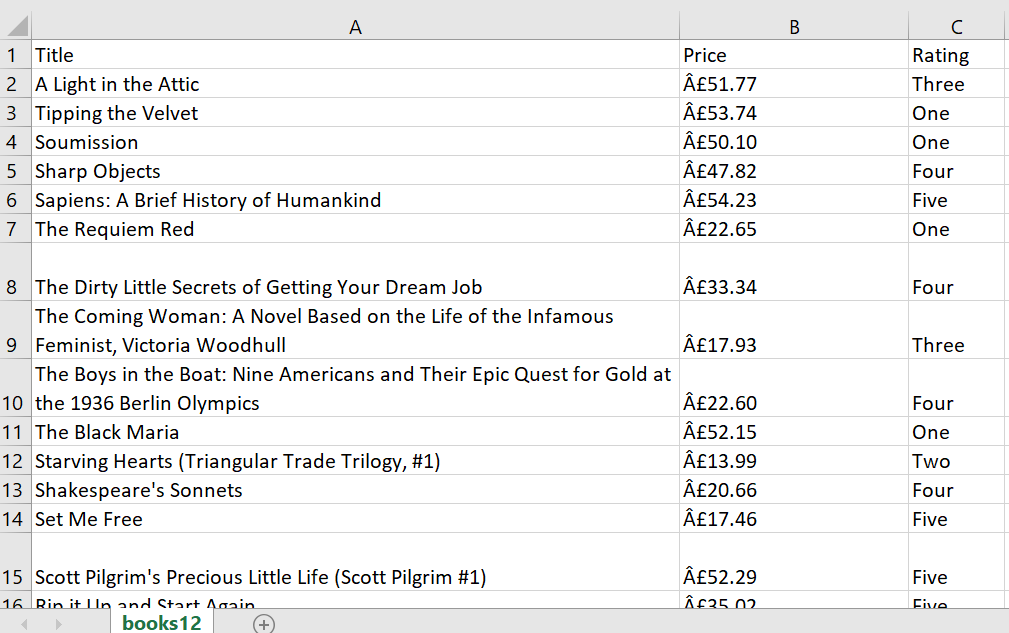
Results :
The project successfully scraped and stored book details into a CSV file. The CSV contains columns for book titles, prices, and ratings, providing a structured dataset for further analysis or use.